会員新規作成
{success} 会員一覧部分で押下した際のの
コンテンツ部分の基本的事項を明記します。
概要
KIZUNAを利用している監理団体の新規作成画面です。
新規作成 →response の ID で詳細取得 → 詳細表示の流れとなります。
CMPS 管理画面からの新規作成と、新規申込フォームで利用します。
お客様向けの申し込みフォームも本ページを参考に作成してください。
基本情報
| 名称 | 定義 | 備考 |
|---|---|---|
| ディレクトリ | components/views/organization | vue.js のディレクトリです。 |
| component | organization-create | vue.js の componennt 名です。 ファイル名はOrganizationCreate |
| route | /organization | route 名です。 |
画面レイアウト図
設計時:
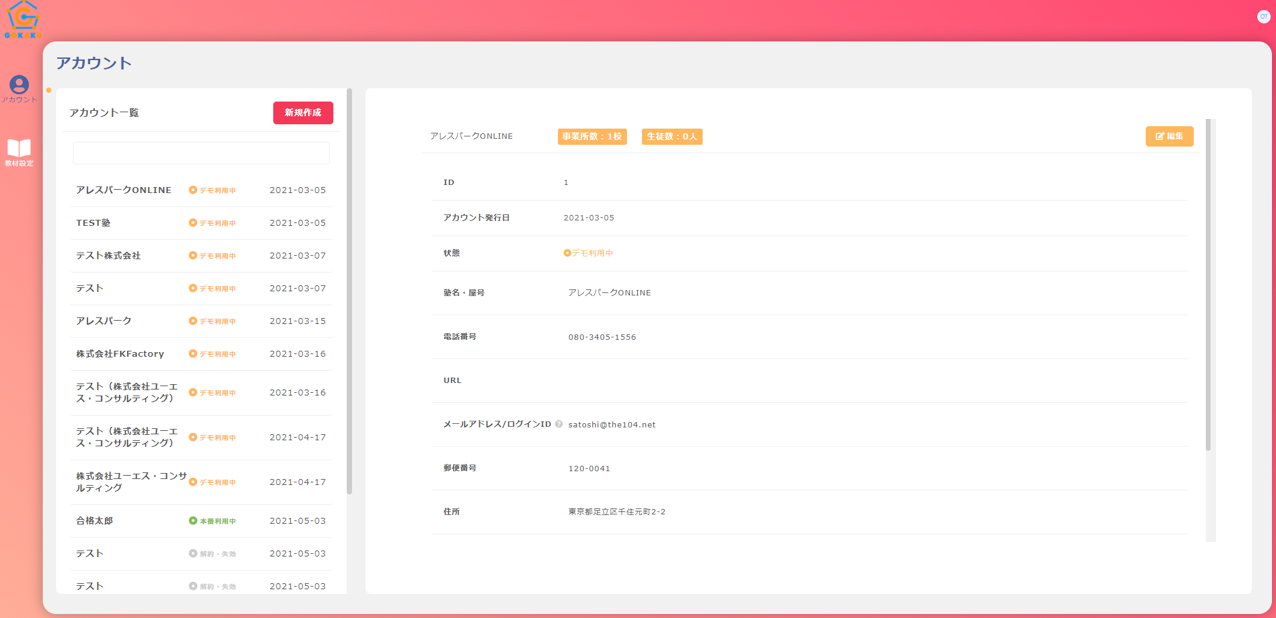
画面項目
{primary} 画面に表示する項目等の情報を記載します。
| No. | 物理名 | 項目・論理名 | タイプ | 必須 | 備考 |
|---|---|---|---|---|---|
| 0 | - | 編集 | button | - | text/input となっている項目を input にして更新ボタン表示 |
| 1 | corporate_number | 法人番号 | text/input | - | organizations->corporate_number |
| 2 | code | 監理団体コード | text | - | organizations->code |
| 3 | name | 監理団体名 | text/input | - | organizations->name |
| 4 | kana | 監理団体名(ふり) | text/input | - | organizations->kana |
| 5 | romaji | 監理団体名(roma) | text/input | - | organizations->romaji |
| 6 | representative_sei | 代表者:姓 | text/input | - | organizations->representative_sei |
| 7 | representative_mei | 代表者:名 | text/input | - | organizations->representative_mei |
| 8 | representative_kana_sei | 代表者:姓(ふり) | text/input | - | organizations->representative_kana_sei |
| 9 | representative_kana_mei | 代表者:名(ふり) | text/input | - | organizations->representative_kana_mei |
| 10 | representative_family_name | 代表者:姓(roma) | text/input | - | organizations->representative_family_name |
| 11 | representative_first_name | 代表者:名(roma) | text/input | - | organizations->representative_first_name |
| 12 | insurance_office_number | 雇用保険適用事業所番号 | text/input | - | organizations->insurance_office_number |
| 13 | organization_type | 団体の区分 | text/input | - | organizations->organization_type※1 |
| 14 | organization_type_other | 団体の区分:その他 | text/input | - | organizations->organization_type_other |
| 15 | numof_employee | 常勤職員数 | text/input | - | organizations->numof_employee |
| 16 | zip1 | 郵便番号 郵便区番号 | text/input | - | organizations->zip1 |
| 17 | zip2 | 郵便番号 町域番号 | text/input | - | organizations->zip2 |
| 18 | address | 所在地 | text/input | - | organizations->address |
| 19 | address_kana | 所在地 ふりがな | text/input | - | organizations->address_kana |
| 20 | address_romaji | 所在地 ローマ字 | text/input | - | organizations->address_romaji |
| 21 | phone1 | TEL 市外局番 | text/input | - | organizations->phone1 |
| 22 | phone2 | TEL 市内局番 | text/input | - | organizations->phone2 |
| 23 | phone3 | TEL 加入者番号 | text/input | - | organizations->phone3 |
| 24 | registration_number | 許可番号 | text/input | - | organizations->registration_number |
| 25 | license_type | 許可の別 | text/input | - | organizations->license_type |
| 26 | メールアドレス | text/input | - | organizations->email | |
| 27 | basic_charge_unit_price | 基本料金単価 | text/input | - | 新規 |
| 28 | pay_per_use_price | 従量課金単価 | text/input | - | 新規 |
| 29 | code | 代理店 | text/select | - | 代理店の名前を表示(valueには代理店CODE) |
| 30 | - | 更新 | button | - | 更新処理 |
※1 : 1.商工会議所・商工会 2.中小企業団体 3.職業訓練法人 4.農業協同組合 5.漁業協同組合 6.公益社団法人・公益財団法人 7.その他
※2 : 解約予定日以降はログインできなくすること/KIZUNA 側で追加処理が必要?
※3 : @todo:カラム追加必要&GMOのAPI次第でカラム変更 KIZUNA の支払方法 1:クレジット 5:コンビニ払い
※- : organizations テーブルの右記カラムはいらないかも?初期費用入金日/本利用開始日/金融機関名/金融機関支店名/口座種別/口座番号/口座名義
画面アクション
{primary} 上記項目の備考で記載しきれないものや、特記事項があるものを記載します。主に画面の処理(フロント)を記載します。
| 対象 No. | 項目名 | 処理内容 |
|---|---|---|
| 編集 | 1 | 押下でtext/inputを input に変更し、更新ボタンを表示 |
| 更新 | 31 | 押下で更新 → 再度詳細取得 API 実行(flash で状態を表示する(成功等)) |
| 代理店 | 30 | ページ開いた時に取得API実行 selectでIDセット |
処理
{primary} 本画面に関する処理を記載します。主にシステムの処理(バックエンド)を記載します。
| No. | 項目名 | 処理内容 |
|---|---|---|
| 1 | 会員情報取得 | 会員情報取得_API |
| 2 | 会員新規作成 | 会員新規作成_API |
| 3 | 代理店一覧取得 | 代理店一覧_API |
成功後の処理
{danger} 新規作成~請求フロー をチェック